




Unvired Digital Enterprise Platform
Unvired Digital Enterprise Platform(UDEP) is a Multi-experience Development Platform to build business apps for mobile, web, Chatbots, Wearables, & Mixed Reality (MR).


We selected the Unvired Digital Enterprise Platform over other competing platforms because it offered us the greatest value, ease of building custom applications and seamless integration with SAP. Kaneka Americas is live on the Unvired Mobile Rounds Manager and the Unvired Warehouse Management mobile apps (that integrate with SAP) which have enhanced our Asset Maintenance and Shipping processes. Another major reason for selecting Unvired is its team of skilled individuals who understand both SAP and Mobility and are able to identify business opportunities. We found Unvired to be flexible, cost-effective, and responsive while delivering on time. We regard them as our extended team.
ANDRE WINTERHALTER
IT Director- Kaneka Americas
Features

Low Code App Development
Drag & Drop components and Process Editor (workflow builder) to build business apps faster.

Digital Platform
A single platform that caters to all touch-points: Vendors, Employees, Customers.

Any Enterprise System
Connect to any enterprise system. Connect natively to SAP via RFCs, Oracle SQL, and Web Services (REST and SOAP).

Deployment Model
UDEP runs on Wildfly 15, MS Azure, and AWS. UDEP is also available for deployment in a Docker environment.

Auto Scaling Cloud
All applications are cloud-ready, move across cloud and on-premise deployments seamlessly in a few hours.

Try & Buy
Easy trials with pre-configured applications with your backend system in less than a day.
Platform Differentiators


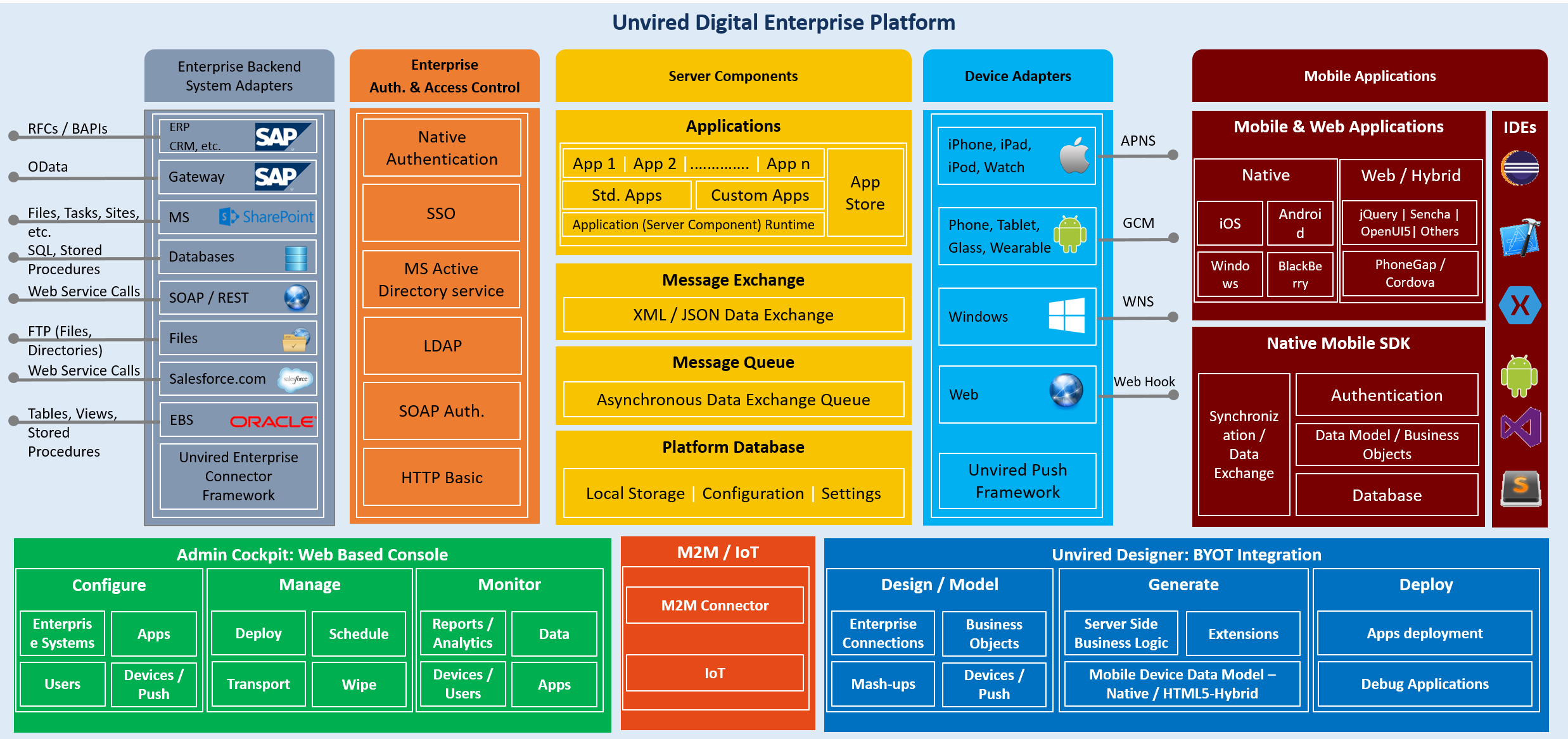
Platform Components
Enterprise Backend System Adapters
Authentication & Access Control
Mobile & Web Data Push Adapters
Technology Components
UDEP REST API
Development Tools
Development Tools
Structured development of Enterprise Mobile and Web Applications.