A pump seal fails at 2 a.m. The night technician cannot find the last repair record. The spare seal is somewhere in the storeroom, but nobody has verified the inventory. The work order is a sticky note.
The pump runs again by morning, but the repair is barely documented. The next shift has no reliable history, the parts record may be wrong, and the same failure can happen again without anyone seeing the pattern.
Computerized maintenance management software is designed to close this gap.
A computerized maintenance management system (CMMS) brings maintenance work orders, asset information, preventive maintenance, inspections, spare parts, and maintenance history into a structured system.
But the value of CMMS software is not simply replacing paper with software.
The objective is to create a reliable maintenance process—from identifying what needs attention, to planning the work, executing it, recording what happened, and using that information to make better maintenance decisions.
This guide explains what a CMMS is, how it works, what it manages, the features and KPIs that matter, the benefits of CMMS software, how to select and implement a solution, and why mobile maintenance is becoming an important part of modern CMMS operations.
What Is a Computerized Maintenance Management System?
Computerized maintenance management system (CMMS) is software used to plan, execute, document, and analyze maintenance activities for physical assets. It centralizes work orders, asset records, preventive maintenance schedules, inspections, spare parts, maintenance history, and reliability information.
The core purpose of a computerized maintenance management tool is to replace fragmented maintenance processes with a connected workflow. Instead of maintenance requests arriving through email, work orders being printed, inspections being recorded on paper, and completed jobs being entered later, the maintenance lifecycle is captured in a structured record.
That record becomes more valuable over time. A completed repair can contribute to asset history, reliability analysis, spare-parts planning, maintenance cost analysis, and future maintenance decisions.
How Does CMMS Software Work?
A computerized maintenance management system connects three basic functions: maintenance data, workflow automation, and maintenance execution.
-
Maintenance Data
The data layer contains the information required to manage maintenance, including equipment records, functional locations, asset hierarchies, maintenance plans, work orders, failure codes, materials, measurements, documents, and historical records. In an enterprise environment, CMMS system may also connect with ERP, EAM, MES, warehouse, IoT, or other business systems.
-
Workflow Automation
The workflow layer determines what maintenance needs to happen and when. A preventive maintenance task might be generated every 90 days or after 2,000 operating hours. A condition-based workflow could create an inspection when vibration or temperature exceeds a defined threshold. Approval rules, priorities, mandatory fields, and standardized failure classifications can also help organizations create consistent maintenance processes.
-
Maintenance Execution
The execution layer connects the planned maintenance activity with the person performing the work. A technician reviews the work order, accesses asset information and instructions, performs the job, and records labour, materials, readings, findings, and completion details.
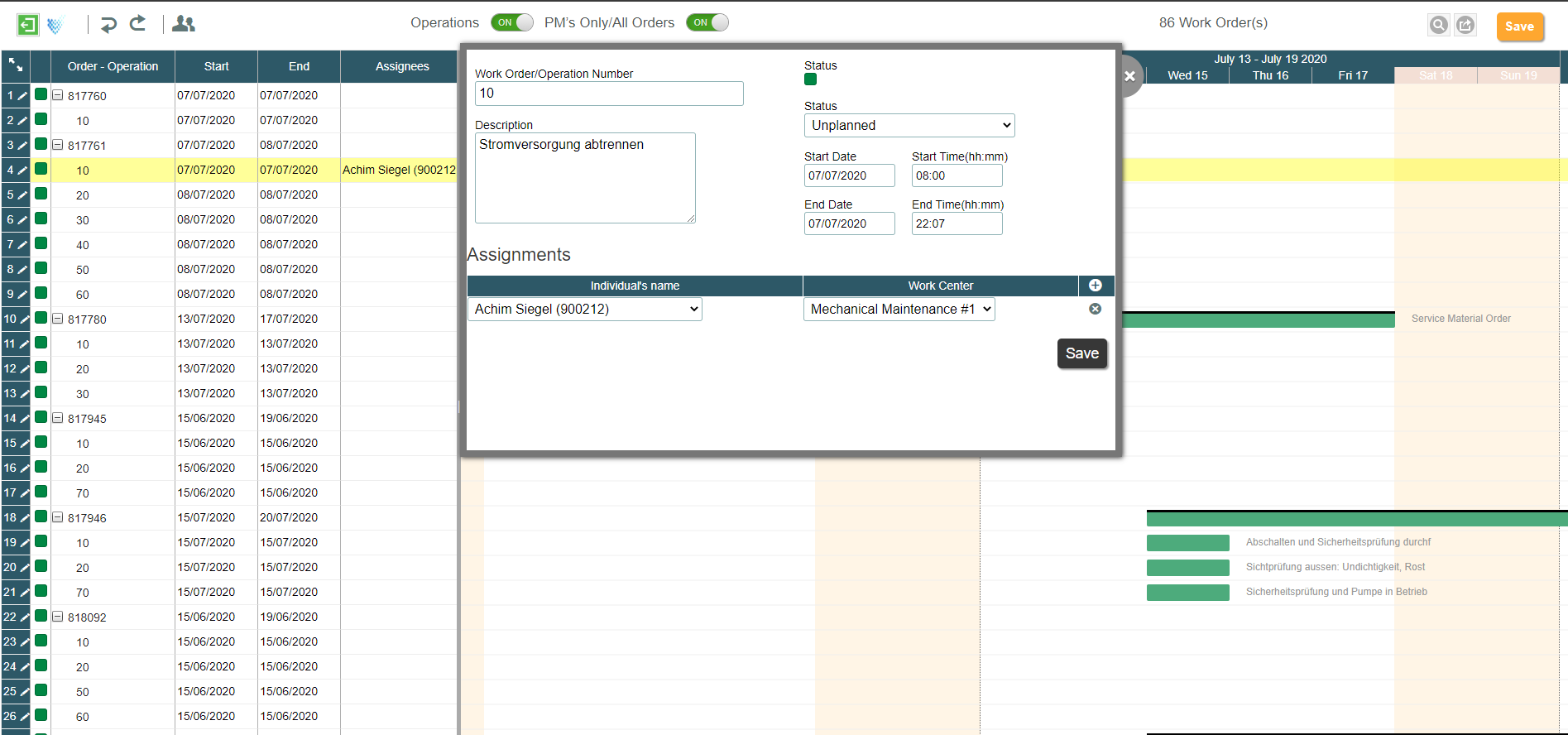
Consider a pump showing abnormal vibration. The planner reviews the pump’s history and finds two previous seal-related failures. A work order is created, the required seal kit is confirmed, and a technician is assigned.
After completing the repair, the technician records the labor, parts consumed, findings, and failure information. The completed work order becomes part of the pump’s history. If the same failure occurs again, the organization now has structured information that can support further investigation.
This is where CMMS data moves beyond administration and becomes a valuable maintenance information asset.
What Does a CMMS Manage?
A CMMS typically manages the core information required to plan, execute, and analyze maintenance. These areas include assets, work orders, preventive maintenance, inspections, MRO inventory, and maintenance history.
-
Asset Management
The asset register provides a structured view of equipment and its relationships. A plant may organize equipment by site, area, production line, functional location, equipment, and component. A properly maintained hierarchy helps maintenance and reliability teams identify where failures and maintenance costs are concentrated. Asset records can also contain technical documents, warranty information, criticality, specifications, and previous maintenance activity.
-
Work Order Management
Work order management software tracks maintenance work from request and planning through scheduling, execution, confirmation, and closure. The quality of the completed work order is critical. If technicians close jobs without recording actual labor, parts, findings, or failure information, the organization loses much of the data required for future reliability analysis. A work order should therefore be treated as more than a task list. It is also a structured record of what happened to an asset.
-
Preventive and Predictive Maintenance
Preventive maintenance (PM) follows a predetermined schedule based on time, meter readings, runtime, or another defined interval. Predictive maintenance (PdM) uses measured asset condition to determine when maintenance may be required.
The appropriate strategy depends on asset criticality, failure behavior, operating conditions, redundancy, and the cost of failure.
| Asset class | Typical profile | Maintenance approach |
| A: Critical | Safety or production critical, limited redundancy, long part lead time | Condition monitoring + PM + critical spares |
| B: Important | Meaningful production impact with some redundancy | Time-, meter-, or runtime-based PM |
| C: Non-critical | Low impact and easy to repair or replace | Minimal PM or planned run-to-failure |
The objective is not to perform more maintenance. It is to apply the right maintenance strategy to the right asset.
-
Inspections
Digital inspections capture readings, defects, photographs, observations, and corrective actions in a structured format. A mature inspection process should also connect abnormal findings to follow-up work. For example, an inspection reading that crosses a defined threshold can create a notification or work order instead of remaining as an isolated observation. For process plants, mobile operator rounds can replace paper logs with defined routes, readings, thresholds, and digital follow-up.
-
MRO Inventory
MRO inventory management tracks maintenance, repair, and operations materials by item, location, quantity, and cost. The objective is not simply to reduce inventory. Maintenance organizations need critical spares available when equipment fails while avoiding unnecessary stock of slow-moving items. Linking material consumption to work orders also improves maintenance cost and inventory visibility.
-
Maintenance History
Every completed maintenance activity contributes to the asset’s historical record. Over time, this history supports reliability analysis, warranty claims, repair-versus-replace decisions, recurring failure investigations, and maintenance strategy reviews.
Key Features of CMMS Software
Feature lists vary widely between CMMS software vendors. Enterprise buyers should focus less on the number of features and more on whether those capabilities work together as one maintenance workflow.
| Feature | What it does | What to evaluate |
| Work Order Management | Creates, assigns, schedules, tracks, and closes work | Priorities, failure codes, approvals, permits |
| Preventive Maintenance | Generates recurring maintenance | Time, meter, runtime, condition triggers |
| Asset Management | Maintains equipment and asset history | Hierarchy, criticality, documents |
| Inspections | Captures readings and findings | Thresholds and follow-up work |
| MRO Inventory | Tracks parts and consumption | Multi-location stock and asset relationships |
| Mobile Maintenance | Brings workflows to technicians | Complete workflow and offline capability |
| Reporting | Measures maintenance performance | MTBF, MTTR, PM compliance, backlog |
| Integration | Connects enterprise systems | SAP, ERP, MES, IoT, APIs |
| Compliance | Provides controlled records | Audit trails, permissions, timestamps |
One feature deserves particular attention: Mobile Maintenance.
A vendor saying that technicians can “access work orders on mobile” does not necessarily mean the complete maintenance process can be performed on the device. For an enterprise implementation, test whether a technician can view the work order, inspect the asset, capture readings, record parts, attach evidence, complete the job, and synchronize the result without returning to paper.
CMMS KPIs: What Should You Measure?
A computerized maintenance management platform turns maintenance activity into measurable performance data. The most useful KPIs show asset reliability, maintenance response, preventive maintenance execution, and technician productivity.
| KPI | Formula | What it measures |
| MTBF | Operating time ÷ number of failures | Asset reliability |
| MTTR | Total repair time ÷ number of repairs | Speed of recovery |
| Availability | MTBF ÷ (MTBF + MTTR) | Operational availability |
| OEE | Availability × Performance × Quality | Overall equipment effectiveness |
| PM compliance | PMs completed on schedule ÷ PMs scheduled | Preventive maintenance execution |
| Planned work ratio | Planned work hours ÷ total work hours | Degree of maintenance planning |
| Wrench time | Hands-on hours ÷ available paid hours | Technician productivity |
For example, if a pump operates for 8,000 hours and fails four times, its MTBF is:
8,000 ÷ 4 = 2,000 hours
If those repairs take 24 hours in total, MTTR is:
24 ÷ 4 = 6 hours
Using the simplified availability equation:
2,000 ÷ (2,000 + 6) ≈ 99.7%
Here, MTBF represents average operating time between failures, while MTTR represents average repair or restoration time after a failure. This is a simplified operational-availability calculation; planned downtime may be treated differently depending on the organization’s availability definition.
The real value comes from analyzing these KPIs by asset criticality, site, equipment type, production line, and failure mode. A plant-wide average can hide a recurring problem on a critical asset, while poor failure-code or work-order data can make even a sophisticated maintenance management software dashboard misleading.
Benefits of CMMS Software
A CMMS creates a structured maintenance process by connecting asset data, work orders, preventive maintenance, inventory, and technician activity in one system. The main benefits include:
-
Reduce unplanned downtime
Identify recurring failures, schedule preventive work, and address issues before they become production disruptions.
-
Improve maintenance planning
Prioritize work based on asset criticality, due dates, failure history, and available resources.
-
Increase PM compliance
Automate preventive maintenance schedules and give teams visibility into overdue and upcoming tasks.
-
Improve technician productivity
Reduce time spent searching for asset history, work instructions, parts information, and work-order details.
-
Control maintenance costs
Track labor, spare parts, repair activity, and maintenance spending at the asset or site level.
-
Strengthen asset reliability
Use maintenance history and failure data to identify recurring problems and improve maintenance strategies.
-
Create better operational visibility
Give maintenance leaders a consistent view of backlog, downtime, workload, compliance, and asset performance.
-
Build a reliable maintenance record
Replace fragmented spreadsheets and paper records with a centralized history of inspections, repairs, failures, and completed work.
CMMS vs. EAM: What’s the Difference?
CMMS and EAM may look similar on the surface, but they generally address different levels of asset and maintenance management.
| Area | CMMS | EAM |
| Primary focus | Maintenance management | Enterprise asset lifecycle |
| Work orders | Core | Core |
| Preventive maintenance | Yes | Yes |
| Asset history | Yes | Yes |
| Spare parts | Maintenance-focused | Broader inventory |
| Asset lifecycle | Maintenance context | End-to-end |
| Procurement & financials | Limited/integrated | More extensive |
| Multi-site operations | Depends on platform | Enterprise-wide |
| Enterprise integrations | Varies | Typically extensive |
| Best suited for | Maintenance teams | Asset-intensive enterprises |
The distinction does not mean that an organization must choose one or the other.
Many enterprise environments use broader EAM capabilities while relying on maintenance-management processes for day-to-day asset care.
The important question is whether the system supports the complete maintenance lifecycle—from planning to execution and back to maintenance history.
Choosing the Right CMMS Software
Selecting computerized maintenance management software should start with the maintenance process rather than the vendor’s feature list.
First, define the problem the organization is trying to solve. It may be excessive reactive maintenance, poor PM compliance, weak asset history, spare-parts problems, paper inspections, slow work-order closure, or a gap between the maintenance system and technicians.
Next, map where maintenance data currently resides. In an enterprise environment, this may include ERP, EAM, MES, warehouse systems, IoT platforms, spreadsheets, and paper records.
The evaluation should then use real maintenance scenarios. A technician should be able to complete a representative job rather than simply navigate a product demonstration.
| Criterion | Suggested weight |
| Integration depth | 20% |
| Mobile and offline execution | 20% |
| Technician usability | 15% |
| Configurability | 15% |
| Security and auditability | 10% |
| Reporting and analytics | 10% |
| Vendor support and total cost | 10% |
The exact weighting should reflect the organization’s priorities. However, integration and field execution deserve significant attention when the CMMS must operate within an existing enterprise technology landscape.
Implementing CMMS Software
A successful computerized maintenance management system implementation starts with process and data discipline, not software configuration alone.
-
Map the Current Maintenance Workflow
Document how work moves from request to completion. Identify paper-based processes, spreadsheets, email approvals, duplicate entry, and delayed updates.
-
Clean and Structure Asset Data
Validate asset hierarchies, equipment records, maintenance plans, materials, measurement points, and failure classifications before using CMMS data for analysis.
-
Standardize Failure Coding
Separate what failed, how it failed, and why it failed. For example, “seal” may identify the failed component, “leakage” the failure mode, and “misalignment” the cause.
-
Start With a Focused Implementation
Pilot high-value processes such as work orders, inspections, or preventive maintenance before expanding into additional workflows.
-
Design Around Technicians
Involve maintenance teams early. If a digital workflow takes longer or adds unnecessary steps compared with the existing process, adoption will suffer.
-
Establish Data Ownership
Assign responsibility for asset data, failure classifications, preventive maintenance standards, user roles, and reporting. The CMMS can enforce standards, but operational teams must maintain data quality.
-
Measure Adoption and Results
Track PM compliance, backlog, MTTR, work-order completion, data quality, and technician adoption after implementation—not just whether the software has been deployed.
Why Mobility Matters in Maintenance Management
A CMMS can centralize maintenance information, automate workflows, improve planning, and provide better visibility into asset performance.
But there is an important point to consider:
Maintenance does not happen inside the CMMS. Maintenance happens at the asset.
A technician may be standing next to a pump, motor, compressor, conveyor, transformer, or production machine when the actual maintenance work takes place.
At that point, the technician may need to access the work order, identify the equipment, review previous maintenance, follow work instructions, perform an inspection, capture readings, record labor, consume spare parts, take photographs, document findings, and complete the work.
If the technician has to return to a desktop, use a paper form, or remember the information and enter it later, the connection between maintenance planning and maintenance execution becomes weaker.
This is why mobility has become an important extension of modern CMMS solution.
Mobile CMMS: Extending Maintenance to the Field
Mobile CMMS extends CMMS functionality to smartphones, tablets, rugged devices, or other mobile devices used by maintenance personnel.
The traditional process may look like this: CMMS → Printed Work Order → Technician → Paper Notes → Manual Entry
A mobile maintenance process can instead become: CMMS → Mobile Technician → Maintenance Execution → Digital Data Capture → CMMS
The objective is not simply to give technicians another way to view information. The objective is to allow them to execute maintenance work and capture the resulting information at the point of work.
A mobile CMMS application should enable technicians to:
- Access and execute work orders
- View asset information
- Review maintenance history
- Perform inspections
- Capture measurements
- Record labour
- Record material consumption
- Add notes and observations
- Attach photographs
- Create maintenance notifications
- Access maintenance documents
- Complete work orders
What Should You Look for in a Mobile CMMS?
Not every mobile maintenance application provides the same level o
f field capability.
When evaluating mobile CMMS tool, ask whether technicians can complete the maintenance workflow from the device.
Important capabilities include:
| Capability | What to Evaluate |
| Work Order Execution | Can technicians view, execute, update, and complete work orders? |
| Asset Information | Can they access equipment information, locations, documents, and history? |
| Inspections | Can they perform inspections and capture structured readings and findings? |
| Measurements | Can they capture temperature, pressure, vibration, or other readings? |
| Photos & Attachments | Can they capture evidence directly from the field? |
| Materials | Can they record spare parts and material consumption? |
| Notifications | Can they report defects or initiate follow-up maintenance? |
| Offline Execution | Can supported activities continue when connectivity is unavailable? |
These capabilities determine whether mobile is simply an additional way to view maintenance information—or a true mobile maintenance execution platform.
Unvired Mobile EAM: Bringing Maintenance to the Field
Unvired Mobile EAM extends SAP enterprise asset management (EAM)/ maintenance processes to technicians and operators through mobile applications.
With Unvired Mobile EAM, maintenance teams can bring work orders, asset information, inspections, operator rounds, notifications, digital forms, and other maintenance workflows to the field. Instead of maintenance information staying inside the system, it reaches the people performing the work.
The objective is straightforward: give maintenance teams the information and workflows they need where the work actually happens. With mobile access to maintenance processes, technicians can capture information at the asset rather than relying on paper forms or delayed data entry.
Want to see how mobile maintenance can work in your environment?
Contact us for a live demo of Unvired Mobile EAM and see how maintenance workflows can be brought to the field.
Frequently Asked Questions
What is CMMS software used for?
CMMS platform is used to manage maintenance work, schedule preventive maintenance, track assets, perform inspections, manage spare parts, maintain maintenance history, and measure maintenance performance.
What features should CMMS application have?
Important CMMS features include work order management, asset management, preventive maintenance, inspections, maintenance history, MRO inventory, reporting, integrations, compliance, and mobile maintenance.
Is mobile capability important in CMMS?
Yes. Maintenance work happens at the physical asset, so technicians need access to work orders, asset information, inspections, documents, measurements, and other maintenance workflows where the work is performed.
What is Mobile CMMS?
Mobile CMMS extends CMMS functionality to mobile devices, allowing technicians to access and execute maintenance workflows at the point of work.
Why is offline capability important in Mobile CMMS?
Maintenance teams may work in areas with weak or unavailable connectivity. Offline capability allows supported maintenance activities to continue without requiring a constant network connection.
What KPIs can be tracked with CMMS?
Common maintenance KPIs include MTBF, MTTR, equipment availability, PM compliance, planned work ratio, maintenance backlog, wrench time, and work-order completion.